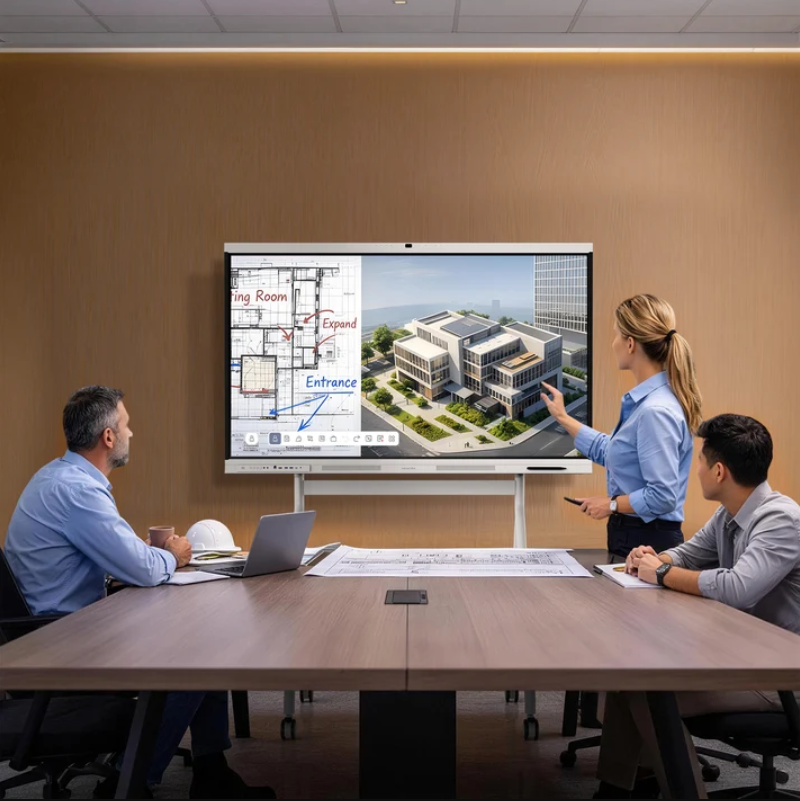
A meeting room display may handle internal presentations, customer discussions, shared documents, and online conferences throughout the working day. When different employees use the same device, security depends on more than the hardware itself. Outdated software, open accounts, and inconsistent settings can create problems for IT teams. Businesses need practical procedures to protect information while keeping meeting rooms accessible to authorized users.
For procurement teams evaluating Nework interactive smart board solutions, three areas deserve particular attention: software updates, access control, and centralized management. These factors influence how devices fit into existing IT policies, how administrators maintain them, and how employees use them safely. Reviewing these requirements before installation can also help businesses avoid unnecessary maintenance work later.
Why Software Updates Matter
Smart boards combine system software, conferencing applications, and connected peripherals. Each component may have different maintenance requirements. Software updates can address known vulnerabilities, correct errors, and maintain compatibility with applications. When devices remain connected to company networks, IT teams need a clear process for reviewing available updates and identifying equipment that requires attention.
A device inventory provides a practical starting point. IT staff can record each board’s location, software version, assigned department, and maintenance contact. This information makes it easier to identify outdated devices and plan maintenance across multiple meeting rooms. It also reduces the need to inspect every device without knowing its current configuration.
Updates should be reviewed before they are deployed widely. A significant change may affect screen sharing, audio output, camera connections, or conferencing applications. Testing the update on one designated device allows IT staff to check essential functions before applying the same change to other rooms. Maintenance windows should also account for meeting schedules and installation-related restarts.
Businesses should clarify how updates are delivered and who is responsible for applying them. Some environments may require administrator approval or internal testing before installation. Purchasing teams should confirm the available update process with the supplier rather than assume that every model supports the same maintenance options.
Access Control Protects Shared Meeting Spaces
Meeting rooms often serve several departments, employees, and external visitors. One person may sign in to retrieve a presentation and then leave without closing the session. The next user could encounter an open account or information left on the display. Clear end-of-meeting procedures can reduce these risks without making ordinary room use unnecessarily complicated.
Employees and administrators also have different responsibilities. Regular users may need to present content or join video calls, while IT staff may need to configure system settings and troubleshoot problems. Where supported, role-based permissions can separate these functions. Individual administrator accounts also help organizations trace configuration changes and review who has access to sensitive controls.
Account management should continue after deployment. When employees leave or contractors finish a project, their access to relevant accounts and services should be reviewed. Shared administrator credentials should be avoided when individual accounts are available. These practices make it easier to manage permissions and reduce the risk of former users retaining access.
Session protection deserves equal attention. Staff should sign out of personal accounts, close confidential documents, disconnect external equipment, and clear temporary content where the system permits it. Screen locking and automatic sign-out can provide additional protection when supported. Companies should verify these functions on the selected device and include them in employee guidance.
Centralized Management Improves Device Oversight
Maintaining one smart board is relatively straightforward. Managing devices across several floors or office locations requires more coordination. Without consistent records, IT staff may struggle to compare software versions, identify configuration differences, and determine which devices need maintenance. These tasks become more demanding as the number of meeting rooms increases.
Centralized management can simplify administration when the selected platform supports it. Depending on the available tools, administrators may be able to review device status, apply configurations, or coordinate maintenance from a shared interface. Buyers should confirm which functions are included, whether additional licenses are required, and which device models are compatible with the management platform.
A standard configuration helps maintain consistency across rooms. IT teams can define approved applications, network requirements, device names, and administrator responsibilities. They can then compare individual devices against the documented configuration and investigate unexpected changes. If centralized tools are unavailable, a scheduled manual inspection process can still provide a consistent approach.
Network access should also be reviewed during deployment. IT staff need to identify the services each board requires and apply company policies for authentication, network segmentation, and external connectivity. Restricting unnecessary access can reduce exposure while allowing approved meeting functions to operate. These decisions should be coordinated with the existing IT team before installation.
Connectivity and Conferencing Need Practical Checks
Meeting equipment should fit the company’s working habits without creating avoidable setup problems. An all-in-one smart meeting board can simplify professional video conferencing. Full-function USB-C supports video, audio, data, and power through one cable, while HDMI provides another connection option for compatible equipment. These features can reduce cable changes when employees bring laptops into a meeting room.
Convenient connections do not replace security procedures. Businesses should define how external laptops, removable storage, and other accessories may be used. In rooms where confidential information is discussed, staff should follow appropriate connection and disconnection procedures. They should also close active sessions before the next meeting begins.
Application compatibility is another procurement consideration. Google-certified EDLA provides access to Google Play, with support for Microsoft Teams, Zoom, and Google Meet. This allows buyers to assess whether the device fits their existing conferencing workflow. However, application availability alone does not confirm that every security control is supported. Account requirements, update responsibilities, and session settings still need to be checked.
When comparing a Nework interactive smart board with other meeting room systems, procurement teams should consider connectivity, application compatibility, maintenance procedures, and access controls together. This creates a more useful basis for comparison than relying on individual features without considering the wider IT environment.
What Buyers Should Confirm Before Deployment
Before approving a purchase, procurement and IT teams should review the available update methods, administrator permissions, session protection functions, and device management options. They should also check network requirements, conferencing compatibility, licensing conditions, and the responsibilities assigned to the supplier and internal support staff.
These points should be documented during supplier discussions. If remote configuration or automatic sign-out is essential, buyers should request confirmation that the function is available on the intended model. This prevents general product descriptions from being mistaken for verified technical capabilities. A clear acceptance checklist also gives IT staff a reference for testing the equipment after installation.
Security continues after the device enters daily use. Regular software reviews, appropriate permissions, consistent configurations, and employee guidance all contribute to better meeting room management. Nework smart board products offer connectivity and conferencing features for professional collaboration, which businesses can evaluate against their operational needs. Confirming specific security capabilities before purchase helps organizations make informed decisions and maintain a practical approach to shared meeting room equipment.
